Hi! We're currently integrating onlyoffice into Nextcloud.
services:
  db:
    image: mariadb:12.3.2
    container_name: nextcloud_db
    restart: unless-stopped
    command: --transaction-isolation=READ-COMMITTED --log-bin=binlog --binlog-format=ROW
    volumes:
      - db:/var/lib/mysql
    environment:
      - MYSQL_ROOT_PASSWORD=
      - MYSQL_PASSWORD=
      - MYSQL_DATABASE=nextcloud
      - MYSQL_USER=nextcloud
    networks:
      - yournetwork

  app:
    image: nextcloud:stable
    container_name: nextcloud
    restart: unless-stopped
    networks:
      - yournetwork
    depends_on:
      - db
    volumes:
      - nextcloud:/var/www/html
      - ./config:/var/www/html/config
    environment:
      - MYSQL_PASSWORD=
      - MYSQL_DATABASE=nextcloud
      - MYSQL_USER=nextcloud
      - MYSQL_HOST=db

  onlyoffice:
    image: onlyoffice/documentserver
    container_name: onlyoffice
    restart: unless-stopped
    networks:
      - yournetwork
    ports:
      - 8080:80
    environment:
      - JWT_SECRET=randomkey
      - JWT_HEADER=AuthorizationJwt
    volumes:
      - ./onlyoffice/logs:/var/log/onlyoffice
      - ./onlyoffice/data:/var/www/onlyoffice/Data

volumes:
  nextcloud:
  db:

networks:
  yournetwork:
    external: true
docker-compose.yml
docker compose up -dOnlyOffice will start on port 8080. If so, everything is working fine. That's all for now.
Now we need to edit the config.php file in NextCloud. It's located at config/config.php. If you didn't add the config folder, you'll need to do so.
volumes:
  - nextcloud:/var/www/html
  - ./config:/var/www/html/config
and we open it config.php
sudo nano config/config.phpIn config.php, we need to add the nextcloud container name to trusted_domains. If this is not done, nextcloud will reject connections from onlyoffice because it will go through http://nextcloud/
'trusted_domains' =>
  array (
    0 => 'cloud.example.com',
    1 => 'your_nextcloud_container_name',
  ),
config.php
Now we need to expose onlyoffice. You can open port 8080 and install onlyoffice on it, but in that case, you'll need to configure https for it separately, which won't be covered in this article.
We'll route onlyoffice through an nginx reverse proxy. Here's an example config.
server {
    listen 80;
    listen [::]:80;
    server_name office.example.com;

    location / {
        return 301 https://$host$request_uri;
    }
}

server {
    listen 443 ssl;
    listen [::]:443 ssl;
    listen 443 quic;
    listen [::]:443 quic;
    server_name office.example.com;
    client_max_body_size 1000M;

    ssl_certificate /etc/letsencrypt/live/example.com/fullchain.pem;
    ssl_certificate_key /etc/letsencrypt/live/example.com/privkey.pem;

    location / {
        proxy_pass http://onlyoffice;
        proxy_set_header Host $host;
        proxy_set_header X-Real-IP $remote_addr;
        proxy_set_header X-Forwarded-For $proxy_add_x_forwarded_for;
        proxy_set_header X-Forwarded-Proto $scheme;
    }
}
onlyoffice.conf
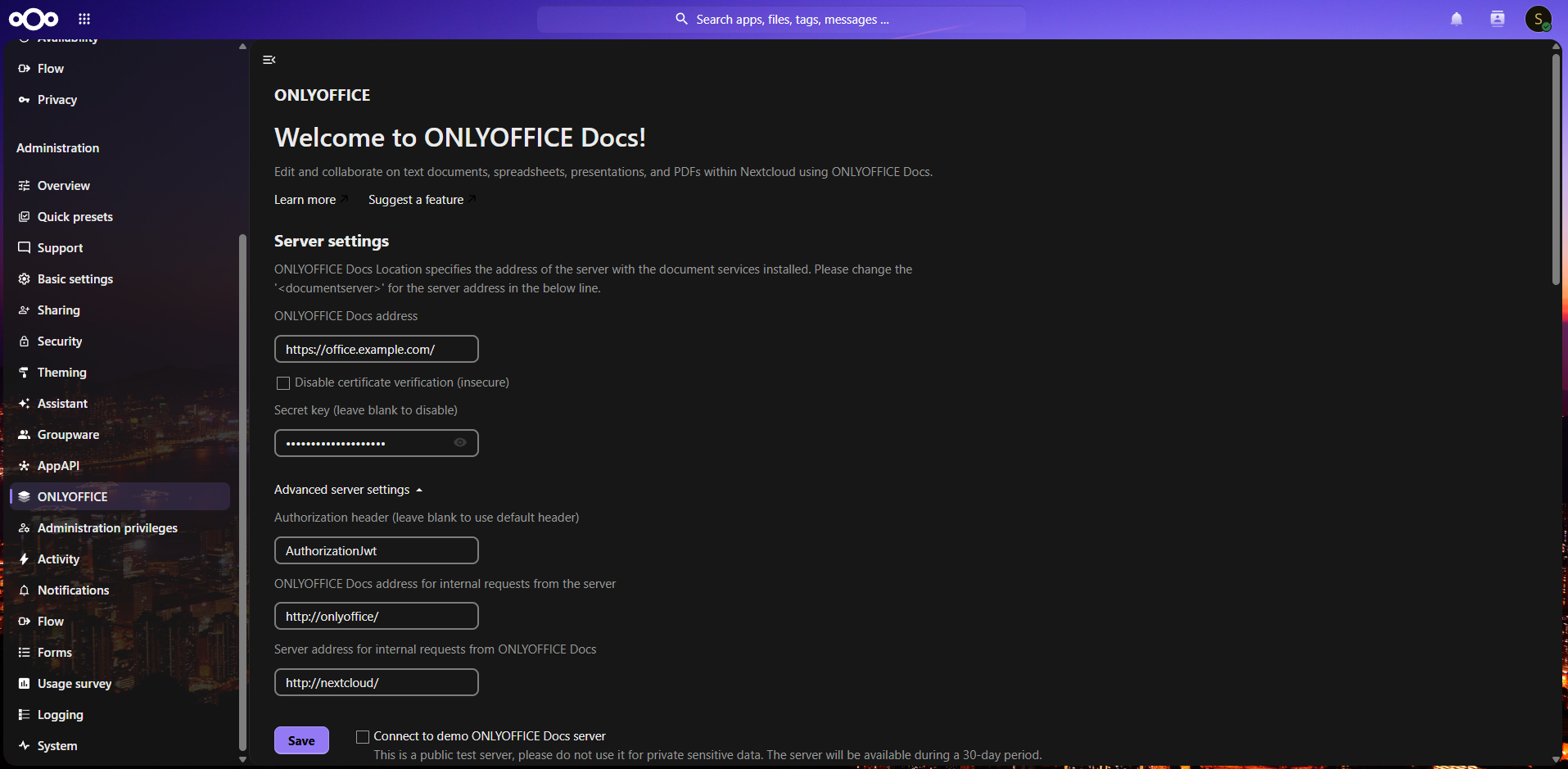
We go to the admin panel of our nextcloud and install onlyoffice in the application center. Now in administration settings go to onlyoffice. In ONLYOFFICE Docs address - office.example.com the address where onlyoffice is located, ONLYOFFICE Docs address for internal requests from the server - http://onlyoffice/ - the name of the onlyoffice container, Server address for internal requests from ONLYOFFICE Docs - http://nextcloud/ - the name of the nextcloud container. Both containers must be on the same docker network. Congratulations! If you did everything correctly, everything will work for you!
Possible errors and their elimination:
- When opening a file in a frame, it says domain.com connection refused. Solution: check the server response headers to onlyoffice to see if there is a "frame-ancestors 'self';" header. If yes, then after removing it the error should go away.
- When you open a file, the editor starts loading endlessly. Solution: check if your browser has extensions like AdBlock. If so, disable them for your nextcloud and onlyoffice. After this the error should go away.